

|
|
 |
Guest - Not logged in | ||||
Reviews > Electronic Devices > Watches > Silva Tech4o TraiLeader 1 > Test Report by Rebecca Stacy
Tester
Information:
Basic
Product
Information:
List of Features (from the Silva website): Speed
&
Distance Mode: Digital
Compass
Mode:
Mode: Barometer
Mode: Time, date, day, 2 alarms, 50 lap Chronograph, 6 timers, dual time zone Product
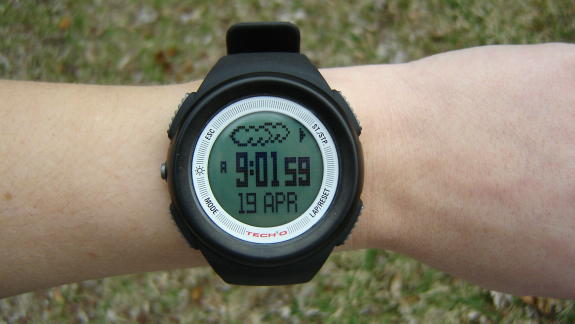
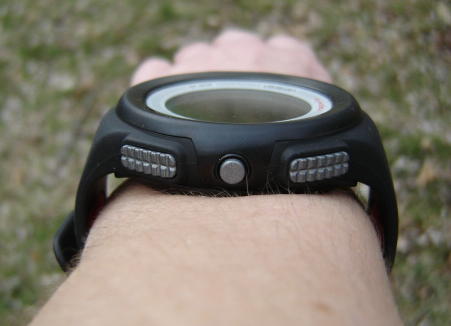
Description: The four main buttons, “ESC” “ST/STP” “LAP/RESET” and “MODE” have a textured button surface and are fairly close-fitting to the watch body; by the feel of them I don’t think these would pose any potential problems with snagging anything. The light button (on the left, between the ESC and MODE buttons is small, round and untextured, though it feels to be protruding a little. The instruction manual warns to keep the watch away from extreme temperatures, impacts, moisture, and near magnets. The watch is listed as water resistant, but not waterproof. Replacing the battery will erase all my personalized data. The TraiLeader 1 has a 1 year limited warranty, and the manual recommends registering the watch on their website. The watch came in a plastic box display case with a color display insert, a quick reference guide, and a manual for the watch.
The watch was in some kind of initial ‘sleep’ mode when I received it, and when I didn’t see anything about waking it in the quick reference card or instructions I went with my intuition and hit the MODE button to wake the watch. It activated immediately, and was set to the US Eastern Daylight Savings Time, along with the correct date. The elevation was over 400 feet (122 m) off, but I expected that I would have to change this upon setup. After about a half hour of reading the manual and setting up the watch, I was up and running. I was initially concerned that I would have to be constantly referring to the manual to figure out how to operate the watch. I discovered that the layout and settings follow a pretty logical pattern, and after a day of playing around with it I am familiar enough with the watch to navigate where I need to without having to refer to the manual.
I'm impressed with all the features packed into this watch, and most
of them would be very helpful to me when hiking if they do indeed
function properly. So far almost everything seems to be working
correctly after the initial setup and calibrations. Functions/Settings:
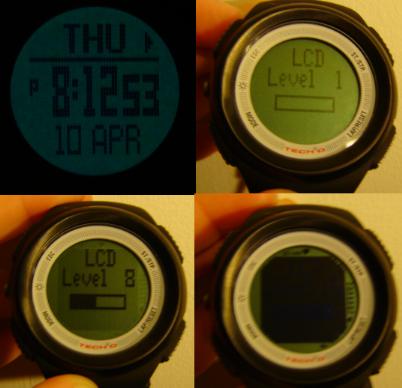
From the Time/Date mode I can adjust the time, date, screen contrast, sound, backlight, temperature units, pressure units, and speed/distance units. Adjusting the time is similar to other digital watches, and I can select either 12 hour (am/pm) mode or 24 hour (military) mode. The LCD has 16 settings, from very little to very high contrast. In lower light conditions the higher setting makes the screen look solid black, but the contrast comes out better in brighter light, though I haven’t had the chance to check it out in full sun yet. For the sound setting, I can turn the button beep on and off, and the hourly chime on and off. The backlight settings are Normal and Night. Normal will only turn the backlight on when I press the backlight button, and Night will turn the backlight on when any button is pressed. On both settings, the backlight lasts for about 4 seconds after the button is pressed. I can select from Fahrenheit or Celsius for the temperature units, mb, hPa, or in Hg for pressure measurements, and Metric or Imperial for all other units. Alarm Mode: Chronograph Mode: Countdown Timer
Mode: Dual Time Zone
Mode: Speed &
Distance: When I start this feature, the watch beeps for about 8 seconds, then starts recording my steps. In this display the current time is shown on the bottom, and my distance in hundredths of a mile or kilometer in the middle. The top of the display will cycle through number of steps, calories burned, walking time, miles or kilometers per hour, and minutes per mile or kilometer. I can save a period of data, which will add it to any other data I’ve saved for the day and clear the current stats from the main display, so I can either record just the periods of activity I want recorded, or record all my activity and the TraiLeader will automatically save all the data at midnight. The watch keeps the saved data from the last 10 days. I can adjust my running and walking stride so the watch can calculate my distance and speed with better accuracy, adjust the ‘Sleep’ setting (how long a period of inactivity passes before the watch stops recording), the sensitivity of the accelerometer, and my weight (for calculating calories burned). The instructions direct me to the tech4o website to calculate my stride length. For the sensitivity, the lowest setting is recommended and I’ve found this level to work fine so far. Altimeter: The altimeter lets me set an altitude alarm, view the altimeter log book, and select between a daily graph or 48 hour graph. The graph is 32 pixels wide, so the 48 hour graph each pixel represents an hour and a half. It looks like the daily graph starts at midnight and “fills in” as the day goes on (from the look at the graph, I think each horizontal pixel might represent 1 hour), while the 48 hour graph is described as being recorded “on a rolling 48 hr. basis”. When I received the TraiLeader, the altitude displayed was a lot higher than my actual altitude. When I went in to correct the altitude, I found out that I had to adjust this in increments of 1 foot (or meter). When I press the button for a few seconds, it will start to quickly adjust by tens of feet/meters, and after a few more seconds will accelerate to adjusting by hundreds of feet/meters. When I first re-adjusted my elevation I wound up ending too high or too low until I got the hang of when to let go of the button. Barometer: After I set the elevation, I checked the barometer to see how it related to local readings. For a period of 8 hours I compared the TraiLeader’s readings with barometric readings from a weather website. The readings of the watch were similar to the website; although the watch measured less pressure (I was on the 3rd floor), general increases and decreases in pressure were about the same for watch and website, even with the altitude lock off. The only thing I’m a little concerned about is that the weather forecaster seems to read the exact opposite of what the changes in barometric pressure should indicate, even when I had the altitude lock on. As I mentioned earlier it said it was sunny in the morning when it was raining outside, and showed rain when the pressure increased. Hopefully the feature just needs a little more time to get acclimated to the local pressure. Compass: Temperature:
Conclusion: Likes: Dislikes:
This concludes my Initial Report. Please check back in about 2 months for my Field Report, and about 4 months for My Long Term Report. I would like to thank Silva and BackpackGearTest.org for the opportunity to test this watch. Field Report 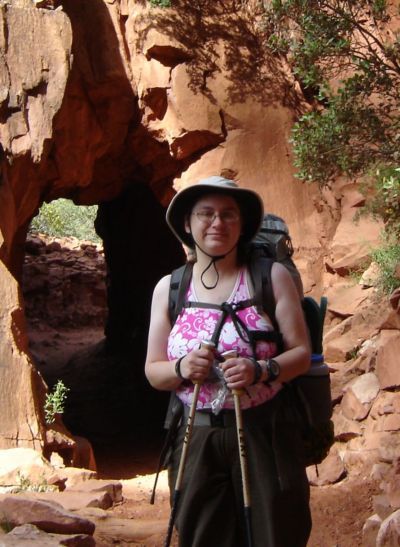 To date, I've used the TraiLeader on my daily lunch break walks of about 1-1.5 miles (1.6-2.4 km), a day hike and an overnighter in late May at Pinckney Recreation Area, and during my 4-night rim-to-rim hike of the Grand Canyon in early June. The watch has proved helpful in all these trips, although it does have its limitations and quirks. Below I've detailed my use of the individual functions that I have used during my dayhikes and backpacking trips. I did not use the chronograph except to check that it worked, and infrequently used the dual time zone function. To the best of my knowledge, these straightforward features work as expected. General durability and construction:After a couple weeks of at-home use, I noticed that something I had done had scratched the watch face. I think it might have gotten scratched by some keys on one of the occasions I put it in my purse. Since I am a klutz and wanted to protect the watch from any future accidents, I custom-cut a screen protector for it from a standard PDA-type protector. I originally thought that putting the sensor for the temperature/barometer on the underside of the watch was a good idea to protect it from the elements, but soon saw that it might actually create as many problems as it solves. When wearing the watch my wrist will quickly start to sweat, and the small channels on the back of the watch aren't deep enough to help aerate the area. When I was hiking in the Grand Canyon dirt and dust would also accumulate under the watch, creating a sort of mud. At one point, this mud clogged all 4 holes on the sensor. It did not appear to affect the readings, or if they did I couldn't tell. Also, since the sensor is directly against my skin the temperature reading is higher than the air temperature, providing the air temperature is below my body temperature. At times it was several degrees higher than the five degrees difference the manual stated. With higher temperatures (over 90 F/32 C) the temperature had better accuracy. The loop that keeps the end of the watchband secure has continued to be a problem, and often the band would either fall out or the loop would migrate so close to the buckle that the band would flap around. Overall, the watch has held up well, with all the use it's seen. When I has hiking in the Grand Canyon I tripped and landed on my left arm. My arm got a scratch about 1" (2.5 cm) in diameter and close to where I wear the watch, but the TraiLeader only got a few small cosmetic scratches on the outer rim. I think the top ring might be made from aluminum or another metal, since one of the scratches has revealed silver-colored material under the black coating. The raised rim seemed to help protect the watch face in this instance, since the screen protector I used wasn't scratched. Main watch function:I didn't keep this mode on much except for around the house. As a watch the TraiLeader works great, and I have not had any problems accessing the temperature, weather, altitude and pressure graphs on this function. The only thing that might be improved is a quicker way to change the temperature from Fahrenheit to Celsius. On one of the days of my hike I encountered an European hiker that wondered what the temperature was. I had the watch set for Fahrenheit for myself, and it took me a while to switch it over to Celsius so I could tell him how hot it was. Alarms:I used the alarms (I had one going off 5 minutes after the other) on the four mornings of my Grand Canyon trip, and they were loud enough to wake me up. This trip I was a light sleeper, or at least had started waking before the watch went off - I tried to keep my body on Eastern time to make getting up early easier. Countdown timer:I've used the countdown timer often to tell me when to head back to the office on my lunch break, since the amount of time I have to walk varies depending on what I have for lunch and if I have to wait in line for the microwave. I've also used it as a backup alarm in the morning on my Grand Canyon trip, setting it to go off 10 minutes after the first alarm. It has always worked well, and I have had no problems with this function. Speed/Distance:I had quite a time figuring out how to make this feature work properly at first. When I started out on my daily walks, I couldn't figure out why it didn't count my steps properly. I tried adjusting to a higher sensitivity, but I still couldn't get the watch to record 100 out of 100 steps. I eventually figured out that I tend to swing my arms a good deal, and the exaggerated movement confused the watch. Also, sometimes the watch does not keep up with my pace, and will suddenly "jump" to the right number of steps after a few seconds. After more playing around and using a GPS to check my distance and the watch properly counting the steps, I ended up setting both the "walk" and "run" stride settings to my walk stride. This provided me with the best results, though I also realized that I don't have an even pace from day to day, especially if I forgot to change to my tennis shoes before I went out. I found out that by placing the watch on the highest sensitivity, I could hold my arm in place in front of me and it would properly count my steps. When I tried attaching the watch to a belt loop, the extra bouncing would confuse the watch and make it count more steps than I actually took. One thing I plan to experiment with is if I can attach it somehow to the shoulder strap of my backpack so it doesn't bounce, and see how that fares. The calorie counter function appears to work properly, at least for my weight and average speed. I typically walk at about 3 miles an hour (4.8 kph), and the readings I got from the watch for my distances travelled fell within the range of calculations I found through online sources. The pedometer function works decently for my local hikes, where there are a fair amount of small hills, but nothing that made me significantly change my stride. On these hikes I used trekking poles, and after a little experimenting, I found that again the exaggerated arm movements were preventing proper recording. I set the watch to the highest sensitivity, and that seemed to do the trick. I also set the stride a little shorter than my normal pace, since there were small hills along the hike, and my overall backpacking pace is shorter than when I'm walking at lunch. When I used the watch in a dayhike and an overnight backpacking trip in Pinckney Recreation Area, the TraiLeader was only off by about 0.2 and 0.4 miles (0.3 and 0.6 km) for the 6 and 7.5 miles (9.7 and 12.1 km) I travelled each day. The second day I had to estimate the distance, since we took a route where the exact distance was unknown due to the use of one of the shortcut trails. The accuracy of the pedometer function on mildly hilly terrain (especially where I don't significantly shorten my stride) seems to be about the same as when I eyeball or rough measure distances on a map. When the terrain forces me to shorten my stride, accuracy goes out the window. On my trip to the Grand Canyon the steep switchbacks forced me to take shorter steps. By the time I had travelled 4 miles (6.4 km) from the trailhead for the North Kaibab Trail to the Supai Tunnel, the watch had already counted 4.6 miles (7.4 km). Since the trails I hiked in the Grand Canyon varied widely on the slope, and hence my stride varied widely, I had no practical way of keeping the watch adjusted to my current stride. One thing about the pedometer function that I really found frustrating was its tendency to stop recording my steps if I switched away from the speed/distance mode to other modes. This happens sometimes when I take a couple of minutes to check altitude, pressure, temperature, etc, but more often when I switch to and stay on another mode when I am recording my distance travelled. This seems to happen somewhere between a third to half the time I move and stay away from the speed/distance mode while still recording. The only time the watch is supposed to stop recording my speed/distance (once I activate the feature) is at midnight, after the watch has been inactive for the period of time I set (which I set to 15 minutes), or when I tell it to. So far, I can't determine any rhyme, reason, specific function that I check, or button that I push that causes the watch to stop recording. When I access the other modes, I will raise my wrist to look at the watch while I am walking (when I walk at lunch I have it set on the lowest sensitivity level), and when I am backpacking I will stop to look at the other functions. My best guess about what is going on is that when I do this sometimes the watch does not sense motion anymore so it stops recording information, and does not start recording again when I am done looking at it. When I do eventually switch back to speed/distance, the watch will usually start counting my steps again (adding it to wherever it had cut out before), going through the 8 beeps to calibrate itself to my stride. I have not had any problems with the speed/distance stopping on me when I keep it in that mode. Barometer:I have monitored the barometer extensively, comparing the readings to NOAA data for Detroit Metro Airport. Although the watch reads lower pressure than what is recorded by NOAA, the change in the readings is always consistent with the change reported by the weather station. The watch won't let me correct the barometer to my local reading since the difference is so far off, and I found that even attempting to correct the sea level pressure (as also reported by NOAA at the location) has no effect on the local reading. Although it's frustrating not having readings that match the local information, it's really the change in pressure that I'm mainly interested in, anyway. I have tried to figure out what the vertical increments are on the graph, and as close as I can figure, each vertical increment is about 0.03 in Hg (1 millibar). Every now and then one of the "dots" will change position on the graph (see picture below) as new readings are taken. It doesn't make much sense, unless the vertical increment itself is subject to change depending on conditions. One thing I have noticed is that the graph will sometimes "top out" and "bottom out", where even new readings are high enough or low enough that they're only another dot on a solid line at the top or bottom of the graph. I think Silva could have done a little better job on the graph, since the barometric history is useless if I can't see what really went on in the past. 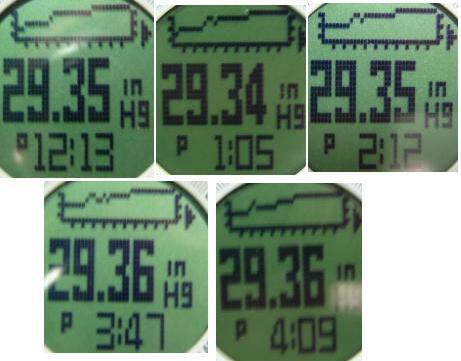 Up until recently the weather forecaster has been pretty accurate, within reason. Although sometimes it calls for rain and I don't get any or it says it's sunny when it's actually cloudy, the forecaster has done a good job of reflecting what the barometric trend indicated the weather would be. On my first day of hiking rim-to-rim in the Grand Canyon the forecaster went from partly cloudy to rain as the day progressed. I had an elevation loss of 4200 feet (1280 m), and the weather report called for only a 20% chance of rain when we started out at 5:30 in the morning. Even with the change in elevation (though I did have to correct this slightly at a couple points on the way down) the watch was correct when it called for rain that day. I really relied on the barometer function when I spent a few hours hiking The Narrows in Zion National Park. The Narrows are where the Virgin River travels through a narrow canyon, and a flash flood is likely any time it rains. The visitor center rangers reported that there was no rain in the forecast (though with the warning that flooding is "always possible"), so my husband and I decided to give it a go. I had the watch on Barometer mode, and was watching it like a hawk the whole time, to make sure the pressure wasn't going down. It was at this point that I wished that I could set the watch to record the pressure every 10 or 15 minutes, so I could better keep track of the pressure when the information in critical to my hike, and not just helpful. Just this past week I've noticed that the weather forecaster was off, showing sun when the pressure had dropped and it was raining. I'm wondering if the airplane trip back confused the watch somewhat, so I took out the battery and replaced it to hopefully "reset" the watch. I will note in my Long Term Report if this did indeed work. Compass:Though the hikes I go on usually don't require use of a compass, it has been pretty accurate when I take the time to properly calibrate it. For my local hikes I took the time to calibrate the watch properly, and it was accurate enough for me to navigate by if need be. When I was at the Grand Canyon I had to reset the declination as well as calibrate the watch. After about 10-15 minutes of trying to calibrate the watch (by moving it slowly in a circle when the calibrate function was active) and still getting incomplete calibration readings, I gave up. When I have the watch in "calibrate" mode I turn it in a circle, the watch will draw a corresponding "box" on the display. Ideally, it will be complete after recalibration (though it can take several calibration attempts); I couldn't calibrate the "box" to the point where most of it was there. Spinning just the watch itself 360 degrees over 30 seconds at a steady pace is a bit tricky for me. The calibration seems to work best when I'm wearing the watch and sitting in a chair that I can spin 360 degrees. When in a swiveling chair, I have more control over the slow turn, and I think the level, even movement when I use this technique helps significantly with the calibration effort. Unfortunately, I didn't have access to such a chair at the Grand Canyon. 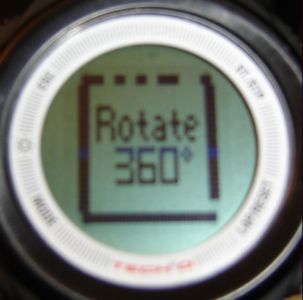 Altimeter: The altimeter seems to be fairly accurate in most circumstances. For this trip I had to rely on elevations provided on my topo map, since our GPS didn't get reception for the majority of our trip. On the first day of my hike I set the reference altitude at the trailhead, and recalibrated once during my hike, at Supai Tunnel. Supai Tunnel is about 1450 feet (442 m) elevation loss from the trailhead, the TraiLeader was off by about 30 feet (9 meters). When I reached camp that day (for a total elevation loss of about 4200 feet/1280 m), the watch was only off about 70 feet (21 m). I was impressed by the accuracy, especially given that there was a storm coming in that day. The next day I had an elevation loss of about 1550 feet (472 m). I didn't recalibrate the second day, and when I reached camp the elevation was off by about 50 feet (15 m). When we hiked back up the Bright Angel Trail the fourth day with an elevation gain of 1350 feet (411 meters), the watch was again pretty accurate, though I forgot to record the information for this day. On our last day, when we had 3040 feet (927 m) elevation gain, the accuracy dropped. I was not able to find out the barometric changes for that day, although the weather was fair the whole day. After I reached the 3-Mile Resthouse which is around 4660 feet/1420 meters above sea level (I had to recalibrate the watch by 100 feet/30m at that point), I decided to set the altitude alarm to tell me when I was 200 feet (61 m) below 1.5 Mile Resthouse, elevation around 5660 feet/1725 meters above sea level . The alarm didn't go off before I reached the resthouse, since the watch thought I was still 300 feet (91 meters) below where I was. I tried resetting the reference elevation two times, and the TraiLeader adjusted back to a significantly lower elevation. When I reached the trailhead (elevation 6860 feet/ 2091 above sea level), the watch was still about 300 feet/91 meters too low. After reaching the rim I reset the reference elevation again, the next morning. This time the watch decided to agree with me, only adjusting the elevation slightly. That afternoon I took the rim-to rim shuttle, travelling a bit over 200 miles (320 km) with about 1400 feet/ 245 meters elevation gain (and a decent bit of change in between). When I reached the North Rim, the watch was only off by about 20-30 feet (6-9 meters), figuring out the elevations I left and arrived using a topo map. During the rim-to-rim ride, I found out that when I first switch to the altimeter mode, the readings will adjust in real-time. I think it was after a minute of remaining on the altimeter function that it would start updating every minute, and I think it was after either a half hour or an hour, the watch did not seem to update (I think at this point it might have updated on the hour). If I switched to another function and then back to the altimeter, it would start this update cycle again. On a dayhike at Pinckney Recreation Area, I tried out the total ascent/total descent feature. Although the hills I hiked in that area are too small for me to accurately verify with a topo map, the total elevation changes recorded seemed within reason. Also, the total ascent and decent matched to the exact foot/meter when I arrived back at my car. I haven't been able to figure out what the vertical increments are for the altimeter; though I think that changes depending on how much elevation change I encounter. The first day when I hiked down the North Kaibab trail in the Grand Canyon, the watch neatly recorded my vertical progress in a graph that looked almost like a cross-section of the rock layers I hiked through! When I'm hiking at home the watch will show the significantly smaller elevation changes I encounter. Findings:So far, the TraiLeader has proved to be a useful addition to my gear list. Overall, it was pretty accurate in elevation in the Grand Canyon, which helped me determine my position on a topo map, when I couldn't pick up enough satellites on the GPS to determine my location that way. The barometer worked well, and the weather forecaster is generally in agreement with the barometric trends. The pedometer is accurate when I am on flat or slightly sloping terrain, but is way off when I have to frequently adjust my stride due to steep switchbacks. The compass is accurate when I take the time to properly calibrate it, and all the other functions (alarms, chronograph, countdown timer) work perfectly. Likes:The altimeter was helpful (for the most part) for me in determining my location in the Grand Canyon, where I could find my location on the trail if I knew my elevation. The barometer gave me an extra measure of safety on my hike of the Zion Narrows, and the weather forecaster warned me of an oncoming storm the first day I was hiking the Grand Canyon, and I decided to make a little more haste to get to camp before it started raining. Overall the watch has proved very helpful on my hikes. Dislikes:The watch band doesn't stay in place, and I have to constantly adjust it so it's not flapping around or catching on anything. The sensor on the bottom is exposed to my sweat, and dirt and dust built up a layer of mud that clogged the holes. After several days of being pretty accurate, the altimeter was off by quite a bit, and wouldn't keep a reference altitude when I set it. The watch will sometimes stop recording my speed/distance information if I switch to another mode and leave it there for an extended period of time. This concludes my Field Report. Long Term Report Since the Field Report, I have continued to use the TraiLeader on local day hikes and for my walks at lunch. During this time all the functions have continued to work as they have for me in the Field Report. The weather predictor function did indeed right itself within a week of removing and replacing the battery, and I feel that it probably was just the airplane trip that messed this function up. The TraiLeader was a great asset to my hikes, and I will continue to take it with me on all my treks in the future. Likes:All the functions of this multi-purpose watch make it a great tool for me when backpacking. The altimeter, barometer, and compass have worked nicely in almost all situations, and the pedometer was a nice feature for me to use on relatively level hikes. Dislikes:The watch band doesn't stay in place, and I have to constantly adjust it so it's not flapping around or catching on anything. The sensor on the bottom is exposed to my sweat, and dirt and dust built up a layer of mud that clogged the holes. At one point on my Grand Canyon trip the altimeter was off by quite a bit, and wouldn't keep a reference altitude when I set it. The watch will sometimes stop recording my speed/distance information if I switch to another mode and leave it there for an extended period of time. I would like to see the option of recording the barometric pressure every 10 or 15 minutes, when changes in the pressure could prove critical to my hiking plans. This concludes my Long Term Report. I would like to thank Silva and BackpackGearTest.org for the opportunity to test this watch. Read more reviews of Silva gear Read more gear reviews by Rebecca Stacy Reviews > Electronic Devices > Watches > Silva Tech4o TraiLeader 1 > Test Report by Rebecca Stacy | |||||
 Initial Impressions:
 Time/Date: